
Honor X7c UFS ISP Pinout Test Point – Complete Guide
Hello technicians, in this guide, we will show you the working image of the Honor X7c UFS ISP Pinout (ALT-LX1 / ALT-LX2). By using the ISP Pinout, you can restore the stock ROM, bypass FRP lock, remove MDM Lock, repair a Dead Boot, or clear user data directly through Flash64, UFI Box, or Easy JTAG.
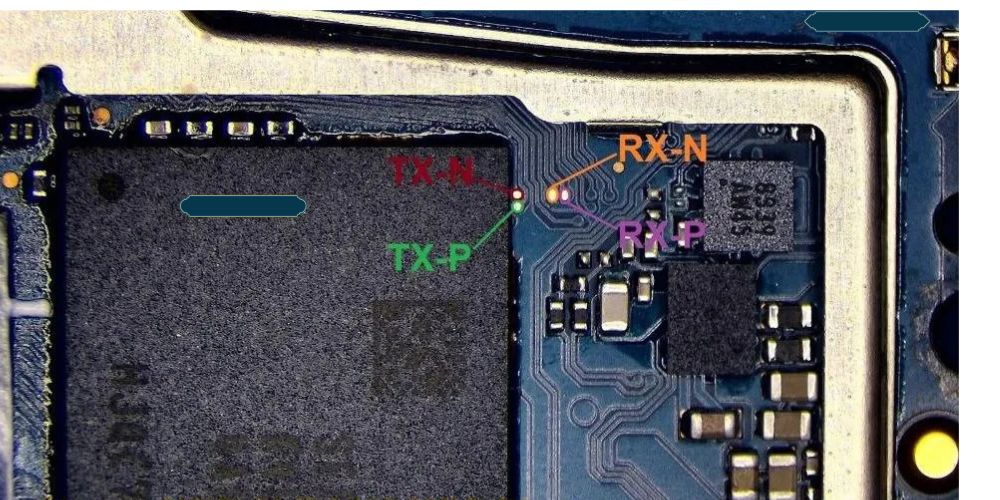
If you handle bricked, network-locked, or PC-dead gadgets as a microsoldering specialist, the ISP connection lets you talk straight to the UFS chip without pulling it off the board. Below we share the tested Honor X7c ALT-LX1 / ALT-LX2 ISP pinout, what each label means, and how to wire it to your UFS programming box.
Xiaomi Redmi A7 ISP Pinout [Test Point]
Vivo Y21 5G ISP Pinout [PD2542 ]
Motorola Edge 50 Pro EDL Test Point [Tested]
Honor X7c Key Specifications
Model Honor X7c 4G (ALT-LX1 / ALT-LX2)
Chipset Qualcomm Snapdragon 685 (SM6225-AD)
Storage UFS – 128 / 256 GB
RAM 6 / 8 GB
Display 6.77-inch
Battery 6000 mAh
Announced October 2024
What is ISP (In-System Programming)?
ISP lets you reach the UFS/EMMC chip without desoldering it. You match the correct pinout on the board and attach a supported tool such as Flash64, UFI, Easy JTAG, or Medusa Pro.
Discover more
Comparing Laptop Models
Comparing Smartphone Plans
Exploring Bluetooth Tech
ISP Pinout is useful when:
The phone is dead (black screen, no boot, no charging)
FRP is locked and ADB, fastboot or OTG bypass is not working
You need to dump firmware from a working unit
You are doing a boot repair or partition restore
The device shows “unknown” on the PC and EDL is not working
Honor X7c UFS ISP Pinout Image:
The ISP pinout is a “CPU drill” style solution because you need to touch the data lines that sit on the board layer. On the Honor X7c the test points sit near the UFS memory chip on the main motherboard. You may need to scratch the protective mask or lift a small part of the EMI shielding to see them.
UFS ISP Pin Labels You Need:
Rst – Reset
TXOP – Transmit Data Positive
TXON – Transmit Data Negative
RXOP – Receive Data Positive
RXON – Receive Data Negative
GND – Ground (connect to any ground point)
Read More:-
Oppo Reno 14 Pro UFS ISP Pinout [Tested]
Samsung SM-S901B Flash File [S22 Firmware ]
Huawei Honor X7c ALT-LX2 Firmware
Required Tools for ISP Pinout
Set up your bench correctly before making any jumper connections.
UFI Box, Easy JTAG, Flash64, or Medusa Pro
0.1mm – 0.3mm jumper wire
Fine tip soldering iron
Soldering flux
Isopropyl alcohol (IPA 99%)
Multimeter (continuity check)
Honor X7c Key Specifications
Model Honor X7c 4G (ALT-LX1 / ALT-LX2)
Chipset Qualcomm Snapdragon 685 (SM6225-AD)
Storage UFS – 128 / 256 GB
RAM 6 / 8 GB
Display 6.77-inch
Battery 6000 mAh
Announced October 2024
How to Connect Honor X7c ISP to the UFS Box
Remove the battery first – prevents voltage conflicts.
Clean the board area with isopropyl alcohol.
Solder jumper wires to Rst, TXOP, TXON, RXOP and RXON points.
Connect the wires to your UFS/EMMC tool following its pinout.
Double-check every wire with a multimeter for shorts.
Connect to UFI or Easy JTAG.
In the software select Identify UFS/EMMC.
Use the operation you need: User Partition → Special Task → Reset FRP.
If the connection is right, you will see the UFS chip info appear in the tool window.
Honor X7c prie in bd
SAMFW.COM_SM-S901B_BOG_S901BXXSLGZA1_fac
Common Issues and Fixes
No chip detected – reflow the solder joints and check continuity on TXON/RXON.
Wrong pin order – flip TXOP/TXON so the differential pair matches the tool.
FRP not clearing – make sure you pick User Partition → Special Task → Reset FRP, not generic erase.
Frequently Asked Questions
### 1. Exactly what is all the Live up too X7c UFS ISP Pinout?
All the Live up too X7c UFS ISP Pinout features discover areas relating to the motherboard which you can use to make sure you talk to your all the UFS memory space nick just for insured maintenance and additionally analysis surgical treatments.
### some. Exactly what is all the Live up too X7c UFS Try Phase intended for?
All the UFS try phase can be installed just for high quality mind surgical treatments that include UFS diagnosis, diagnostics, reassurance, and additionally insured read/write or possibly remedy measures.
### 3. In which symptoms are commonly important for UFS ISP?
Pc designer and additionally company, usual symptoms feature **GND, VCC, VCCQ, CLK, CMD, and additionally statistics lines**.
### have a look at. Does one benefit from whatever UFS designer along with the Live up too X7c?
Basically no. All the designer has to sustain all the focused UFS basic, mind construction, and additionally requested maintenance works.
### 5. Why does great Live up too X7c UFS not likely seen?
Practical can cause feature false ISP connectors, awful GND, false voltage, defective try areas, motherboard affect, or even defective UFS nick.
### 6. Certainly is the Live up too X7c UFS ISP Pinout the equivalent relating to just about every single motherboard?
Might be no. Enter minor changes may have some varied styles or possibly test-point controls. Frequently assess the precise motherboard prior to when binding a fabulous designer.
### 7. Implement I have to take away the UFS nick just for ISP succeed?
During the course of ISP measures, all the UFS nick is levied for all the motherboard lacking cleaning out the software. Still, a lot of improvements may necessitate nick fading pc flaw and additionally appliances.
### 8. The things guide lines should i receive prior to when binding ISP?
Disconnect all the wide variety, assess all the pinout, search for pants, prove an accurate voltage, and additionally mindfully research just about every single bond using magnification.
### 9. May well UFS ISP remedy an absolutely gone Live up too X7c?
It can help identify or possibly talk about confident memory space or possibly boot-related trouble, still ISP exclusively cannot really remedy all types about dead-device flaw.
### 10. Just where does one discover Live up too X7c UFS ISP Pinout Try Phase?
A fabulous shown motherboard-specific pinout or possibly test-point diagram have to be put into use. Evade determined by any unverified snapshot as false connectors may harm all the UFS or possibly motherboard.
Is Honor X7c UFS or eMMC?
The Honor X7c uses UFS storage, so you need a UFS-capable ISP tool like Flash64, UFI, Easy JTAG or Medusa Pro.
Read More:– Honor X5 Plus EMMC ISP PinOUT | Test point
Which model boards does the X7c cover?
This pinout covers the ALT-LX1 and ALT-LX2 board variants of the Honor X7c 4G.
Can I bypass FRP using the Honor X7c ISP pinout?
Yes. Connect via ISP and use the User Partition → Special Task → Reset FRP option to clear the lock.
Honor X7c UFS ISP Pinout – Final Word
All the Live up too X7c UFS ISP Pinout is a really vital benchmark just for high quality wireless staffs experiencing UFS memory space and additionally motherboard-level remedy. Precise individuality about GND, VCC, VCCQ, CLK, CMD, and additionally statistics marks is obviously important prior to when binding a fabulous designer.
As varied motherboard minor changes make use of varied test-point styles, frequently assess the precise enter and additionally pinout before you start whatever UFS company.
Just for good remedy succeed, have a very high quality microscope, multimeter, correct UFS designer, along with shown motherboard-specific pinout.
Realme 7i FRP Reset Tool [Without EDL]
Samsung Galaxy M11 Firmware (SM-M115F)
